AI testing standards your assistant reads before it writes
AI testing standards as Sekee AI rules. Requirement, bug report and run-summary rules word for word, rule history, and how AI work is labelled.
The Sekee team 9 min read
AI testing standards are the conventions your team already has for requirements, test cases, bug reports and run summaries, written down so that an AI assistant follows them as well as people do. This post shows a working set, word for word, how they live as AI rules in Sekee, how changes to them are recorded, and how you can tell afterwards which work came from the assistant.
Full disclosure: I build Sekee. Let's say you work for Brightwell (a fictional company) as its only QA engineer. Brightwell makes field-service scheduling software: dispatchers book jobs, technicians get them on their phones, customers approve quotes and pay invoices. About eight developers, one of you, and Claude Code doing most of the typing. It writes Playwright specs, creates test cases, writes requirement descriptions, summarises runs and drafts bug reports, all through Sekee's AI connector. Your job is to review what it produces.
Standards that live in prompts don't last
In your first weeks with Claude, the bug template lives in your head and in whatever you paste into the chat. On a good day you paste it. On a busy day you don't, and Claude writes a perfectly readable bug with a "Root cause" section and a "Suggested fix" underneath. Both are guesses. A developer reads the suggested fix, tries it, and loses half an afternoon.
Then a developer connects their own assistant to write test cases for a feature they're finishing. The cases are fine, but named differently, filed in the root folder, and linked to nothing.
A standard typed into a prompt lasts as long as that conversation. A standard that the tool hands to every assistant, before it writes anything, lasts until somebody changes it on purpose.
Where AI rules live in Sekee
Sekee runs no AI model of its own. You connect the assistant you already use (Claude, Copilot, Cursor and others) through Sekee's AI connector, an MCP server, and it works as you, with your permissions. AI rules are the standing guidance that every connected assistant reads before it writes.
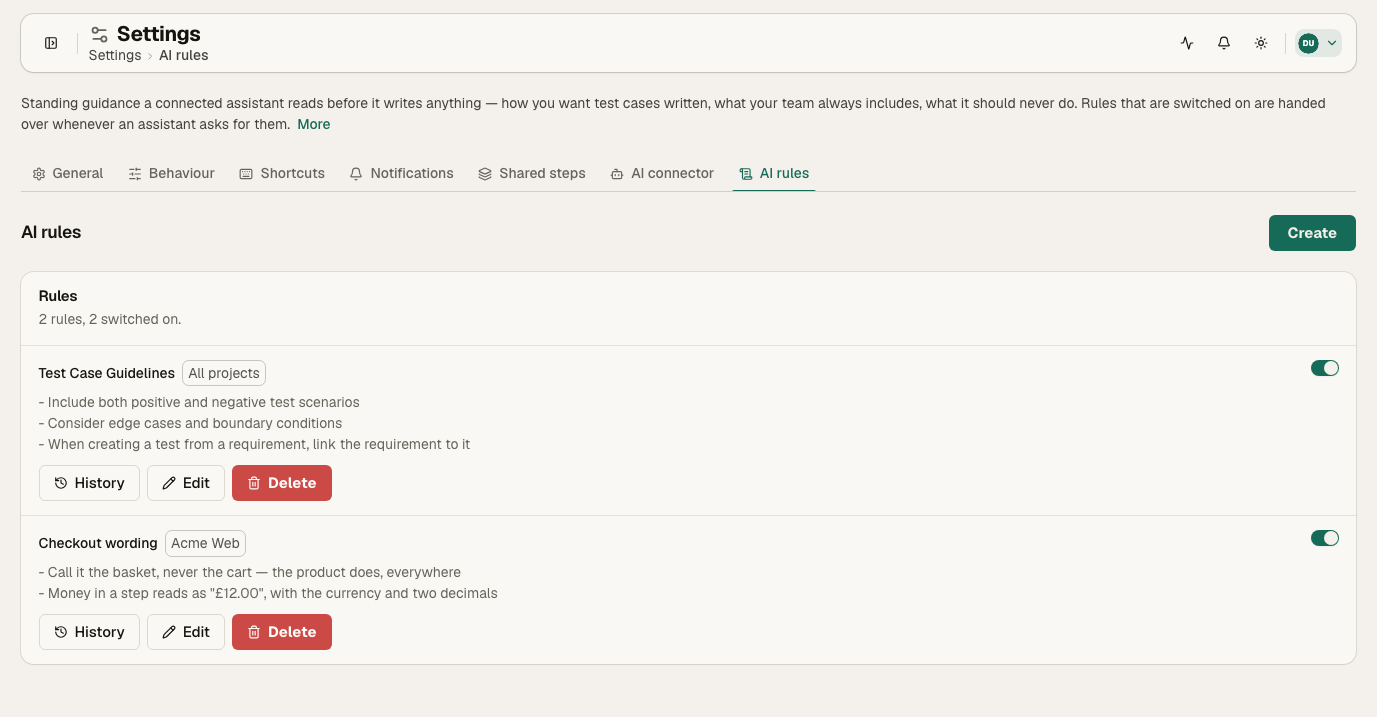
AI rules in Sekee's demo, each with its scope, history and switch.
They are under Settings → AI Rules. Each rule has a name, a body, an on/off switch and, optionally, a project. A rule with no project applies across the whole organization. Everyone can read the rules and their history, but only owners and admins can create, edit, switch or delete one, because a rule changes how every assistant in the organization writes. The AI rules page in the manual has the details.
Every new organization starts with one rule, Test Case Guidelines: include positive and negative scenarios, consider edge cases and boundaries, and link the requirement when a test is written from one. Keep it. The last line is the one that matters most, because Sekee works out coverage from links, and an unlinked case leaves its requirement reading as uncovered.
A set of rules, word for word
Besides the default, Brightwell has five rules. Here are the four worth copying first.
The requirement structure
When you write a requirement's description, use these four headings, in this order:

Requirement: one sentence, one behaviour. If it needs "and", it is two requirements.
Preconditions: the state and data that must exist before the behaviour applies.
Acceptance criteria: Given / When / Then. At least one positive and one negative path.
Traceability: "Verified by <test case name>" for every linked test case.

Describe behaviour, never implementation. If the ticket does not say what should
happen, ask. Do not invent it.
Say Claude writes a requirement that starts "A customer can approve a quote from the email link without signing in", and its negative path covers a quote that has expired. Read it the way you'd read a developer's pull request: check that it describes one behaviour, that you could test it as written, and that the negative path says what the customer sees.
One limit worth knowing: an assistant can only write the description of a requirement written in Sekee. A requirement imported from Jira keeps Jira's description, and Sekee refuses to let an assistant change it, because the next sync would throw the edit away. That's a good reason to write your testing requirements in Sekee. The requirements page explains the split.
The bug report
Every bug report has exactly these nine sections, in this order, and nothing else:

Steps to reproduce
Expected
Actual
Screenshots/Videos/Logs
Additional info
Environment
Severity
Workaround
Affected users

Do not guess at causes. Do not suggest a fix. If you do not know something,
say what you saw and leave the explanation to whoever fixes it.
The last paragraph is the important one. Without it, a model fills the silence with theories. Developers read reports like these because every one has the same shape and none of them tells them how to do their job.
The run summary
When you write an automation run's AI summary:

First line: what ran (suite, brands, environment).
Second line: passed, failed and skipped, out of the total.
Then three sections:
  Product bugs: one line per problem, with the Sekee bug number or "not filed yet".
  Test defects: failures caused by our spec, our data or our setup.
  QA notes: anything else the next reader needs.

Product bugs + test defects + unchecked must equal the failed total.
Any failure you have not looked at is counted as unchecked and listed under QA notes.
A scheduled Claude routine can write one of these for each new run every morning. Only an assistant can write a run's AI summary in Sekee, so this rule shapes every one of them.
Test cases and links
- One Playwright spec file is one test case. Link one representative test from the
  spec to the case, not every test in it.
- Link every case to the requirement it proves. A case without a requirement is unfinished.
- Name cases "<action> <expected outcome>", e.g. "Reject approval of an expired quote".
The first line is a trade-off. One link per spec keeps traceability readable, and the case's automation result is that one test's result. If another test in the spec fails, the case does not show it. That's acceptable, because the run shows it.
What makes a rule work
Be specific about the output. "Write good bug reports" changes nothing. Nine named sections in a fixed order do.
Write the "don't" lines. Models have habits. Claude likes to explain causes and to round off a summary with a reassuring sentence. Telling it what not to write works better than hoping it won't.
Say what to link. Assistants forget relationships far more often than they forget content. Two of the three lines in the test case rule are about links.
Keep each rule short. Rules are handed to the assistant before the real work, and a page of them crowds out the task. The longest one here is the bug rule.
One standard per rule. Requirements, bugs, summaries and test cases are separate rules, so you can switch one off without touching the others, and the history of each reads cleanly.
Rules are still instructions to a model, so they steer. They do not enforce. Every so often a bug will still arrive with a cheerful "Possible cause" line at the bottom. The enforcement is the review, and the labels below.
Scoping a rule to one project
Brightwell's fifth rule belongs to one project only: the technician app, which runs on phones. Its steps need the phone's state in them (online or offline, location on or off), which would be noise in the office app's steps. A rule with a project set applies only to work in that project.
If that project is ever deleted, the rule doesn't quietly start applying everywhere. It stays, marked Unapplied, and no assistant is told it until an owner or admin decides where it belongs. It fails closed, which is the right default.
Rule history: who changed the standard, and why
Every edit to a rule, and every switch on or off, asks for a reason, and nothing is saved without one. History on each rule then shows who changed it, when, why, and what changed: the text line by line, removed lines in red, added lines in green.
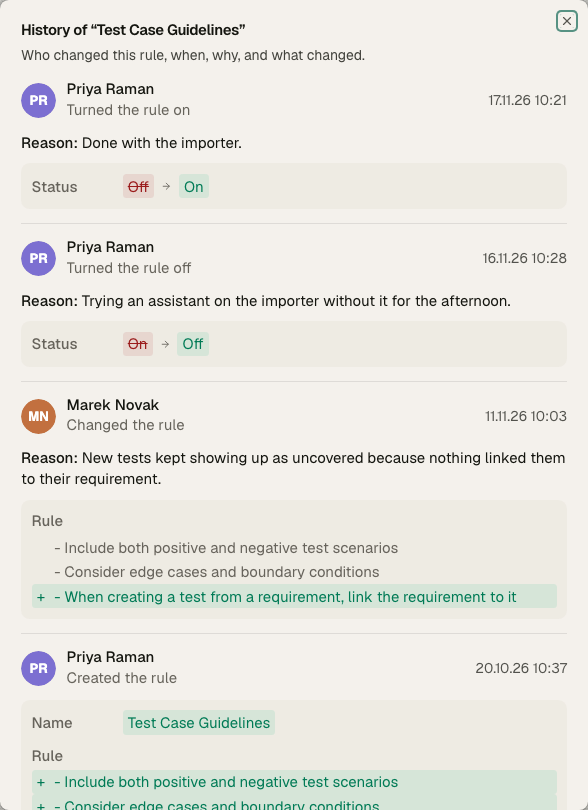
A rule's history: every change, with the reason given for it.
Take the "unchecked" line in the run-summary rule. Say one morning a summary files all seven failures as test defects, when Claude has looked at only three. The other four include a product bug in German invoice totals. You add the line that day, and the reason you type stays in the history: "Summary called 7 failures test defects, only 3 were checked."
That history earns its keep when someone asks why things are the way they are. When a developer asks why bug reports never suggest a fix any more, send them the rule's history instead of explaining it again.
Deleting a rule deletes its history, so switch rules off rather than delete them. The switch asks for a reason too, and the reason stays.
The AI labels: how you know what the assistant wrote
Rules shape what the assistant writes. Labels tell you afterwards which work was the assistant's, and Sekee sets them from the connection's signed token, not from anything the assistant sends. An assistant cannot shake them off, and a browser cannot claim them.
| What Claude did | What Sekee shows |
|---|---|
| Created a test case | Marked AI generated, and queued for review |
| Changed a test case a person wrote | Marked AI modified, and queued for review |
| Changed an approved test case | The approval is withdrawn and the case is queued again |
| Wrote a requirement's description | Written by AI beside the description, until a person rewrites it |
| Wrote a comment | An AI generated badge beside the author |
| Wrote a run's AI summary | Shown under AI summary, which only a connector can write |
The Review screen is your queue for test cases: each row says Written or Modified, and Waiting since puts a two-year-old case Claude edited this morning at the top. The test case review page covers how approval works.
The requirement mark behaves differently, and it is worth understanding. Written by AI describes the text, not the requirement. When you edit the description yourself, the mark goes. So it tells you nobody has touched the words since the assistant wrote them. It does not tell you whether a person has read them. A requirement you review and leave alone still says Written by AI, and that is honest: the words are Claude's, and you only agreed with them.
The case for bringing your own assistant is in bring your own AI to your test management.
FAQ
What are AI testing standards?
They are your team's conventions for tests, requirements, bug reports and summaries, written as instructions an AI assistant receives before it writes. Good ones describe the output precisely: named sections, a fixed order, what to link and what never to include. In Sekee they are stored as AI rules and given to every connected assistant.
How do I get an AI assistant to follow our test case conventions?
Write the conventions down as short, specific rules and put them where every assistant reads them, rather than in individual prompts. Name the format, give one example, and say what not to do. Then review the output, because a model follows rules most of the time, not all of the time.
How can I tell which test cases an AI assistant wrote?
In Sekee, a test case created through the AI connector is marked AI generated, and one it changed is marked AI modified. Both go to the Review screen until a person approves them, and an assistant's edit to an approved case withdraws the approval. The marks come from the connection's token, so they cannot be removed by the assistant.
If you want to try this workflow, Sekee's pricing page has the details.
- AI
- AI rules
- testing standards
- MCP