How to run a bug bash, with a template you can copy
Plan, run and follow up a bug bash that finds real bugs, not duplicates. Goals, roles, a timebox, triage rules and a copyable template.
The Sekee team 10 min read
A bug bash is a short, focused event where a group of people use the product at the same time to find bugs before a release. Testers take part, but so do developers, product managers, designers and support staff, and that mix is the point: each of them knows a different part of the product and uses it differently.
Done well, a bug bash finds problems that slipped past everyone working alone. Done badly, it is two hours of people poking at the same login screen and filing twenty versions of one vague bug. The difference is almost entirely preparation and follow-up.
This guide covers the whole event: deciding whether to hold one, preparing, running it, triaging what comes in and following up. A plain-text template you can copy is near the end, and the last section shows how the same event runs in Sekee.
When a bug bash is worth it
A bug bash earns its cost when a lot of new surface is about to reach users at once:
- a major release, or a feature that is complete enough to use from end to end
- a redesign, where everything looks familiar but behaves slightly differently
- a large refactor or migration that should have changed nothing visible
- a new platform, such as the first mobile build of a web product
It is the wrong tool when the build is too unstable to use (run a smoke test first, or you will spend the event reporting the same crash), and it is not a replacement for regression testing. A bug bash finds the problems nobody thought to write a test for. It does not prove that last month's features still work.
Set a goal and a scope
Write the goal as one sentence before you invite anyone. "Find problems in the new checkout before the 4 December release" is a goal. "Test the app" is not.
Then write down the scope, in two lists:
- In scope: the features, platforms and user roles you want covered.
- Out of scope: areas still being built, known-broken integrations, anything you already know about and do not want reported again.
Collect the known issues too. Nothing drains goodwill faster than a participant spending twenty minutes on a bug that was filed last week. Give people the list before they start.
Finally, pin down the build and environment: which version, which URL, which feature flags are on. Every bug report will refer back to it.
Prepare the ground
Most of a bug bash's success is decided before it starts. A day or two ahead:
- Deploy a stable build to a test environment and smoke test it yourself.
- Create test accounts and data for every role in scope, with enough data that lists, searches and reports have something to show. Sharing one admin account between twelve people produces bugs about the shared account.
- Check devices and browsers. If mobile is in scope, make sure someone has a phone with the build on it.
- Decide where bugs go and how to report them. A short checklist helps people who do not file bugs for a living: a title that says what is wrong, steps to reproduce, what happened, what should have happened, and a screenshot or recording.
- Agree severity levels so participants and the triage lead mean the same thing. Four levels are usually enough:
| Severity | Means |
|---|---|
| Critical | Data loss, security problem, or a core flow is blocked with no workaround |
| High | A core flow is broken but has a workaround, or many users will hit it |
| Medium | Something is wrong but most users can carry on |
| Low | Cosmetic, wording, or a rare edge case |
Give people roles
A bug bash runs more smoothly when a few people have a job other than finding bugs:
- Host. Opens the event, explains the goal and scope, keeps time, and keeps people moving when they get stuck.
- Product expert. Answers "is this a bug or is it meant to work like that?" quickly, so people do not argue in the reports.
- Triage lead. Reads reports as they arrive, merges duplicates, sets severity and asks for missing details while the reporter still remembers them.
- Participants. Everyone else. Aim for a mix: someone new to the product, someone who knows its history, someone from support who knows what customers complain about.
On a small team one person can host and triage, but name them in advance so it happens.
Split the work
Left alone, everyone tests the first screen they see. Give each participant somewhere to start. Two approaches work, and they combine well:
- Assigned areas or test cases. Hand out a short list of scenarios per person, or per pair, so the whole scope is covered. This is the scripted half.
- Charters. Give each person or pair a one-line mission to explore, such as "Explore discount codes with expired, stacked and region-locked codes to discover pricing errors." This is the exploratory half, and it is where the surprising bugs come from. Our guide to exploratory testing charters covers how to write them.
Pair people from different disciplines where you can. A developer and a support agent testing together find different things than either would alone.
Keep it to a timebox
People's attention fades faster than you would expect, so keep the hunting itself short and protect the time either side of it. A typical shape:
- 10 minutes of kickoff: goal, scope, known issues, how to report, who to ask
- 60 to 90 minutes of hunting
- 20 to 30 minutes of wrap-up: the triage lead walks through the most severe bugs and the host thanks everyone
During the hunt, the host can post an update halfway ("14 bugs so far, nothing in payments yet, could someone take payments?") to steer people towards gaps.
Triage as you go, and finish it afterwards
Triage answers four questions for every report:
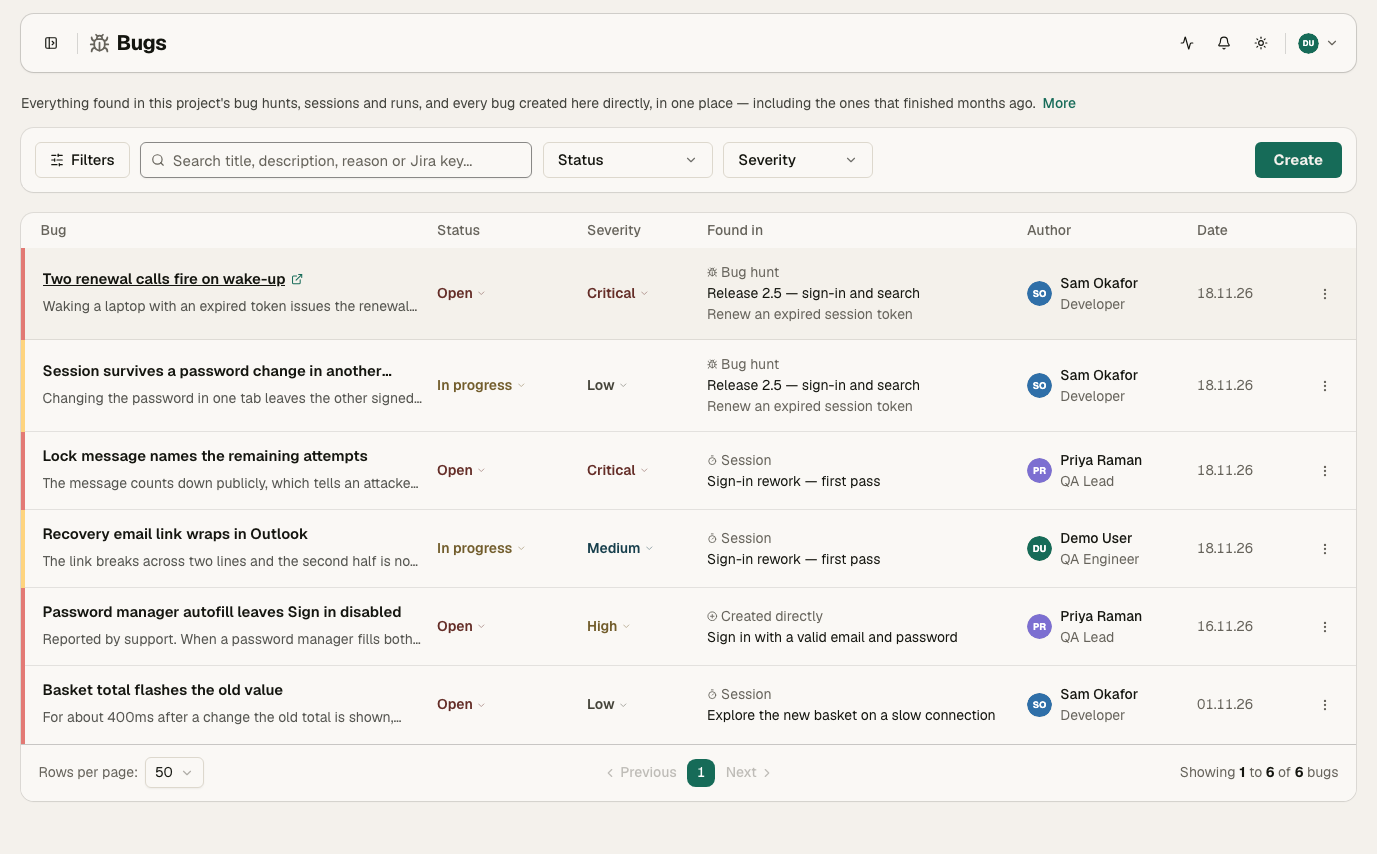
One list of bugs in Sekee's demo, wherever they were found.
- Is it a bug? Or is it working as designed, a question, or a feature request? Turn those into notes, not bugs.
- Is it a duplicate? Merge it into the original and keep any extra detail.
- How severe is it? Use the scale everyone agreed on.
- What happens next? Fix before release, fix later, or won't fix, with a reason written down.
Triage critical bugs during the event, while the reporter is still there to answer questions. Leave the rest for a short session the next day rather than letting the wrap-up run long. A bug closed as won't fix without a reason tends to be reported again at the next bug bash, so always write the reason down.
Follow up
A bug bash that ends with "thanks everyone" and nothing else teaches people not to come to the next one. Within a day or two:
- Share a summary: how many bugs were found, how many are severe, what blocks the release and what does not.
- Assign owners to everything you decided to fix.
- Verify fixes against the original report before closing them.
- Hold a short retrospective: was the scope right, did people know what to do, which areas were missed?
- Tell participants what happened to the bugs they found. It is the best invitation to the next one.
A bug bash template
Copy this into your team's document or tracker and fill it in.
BUG BASH PLAN

Name:            <e.g. Checkout redesign bug bash>
Date and time:   <date>, <start>–<end> (<timezone>)
Goal:            <one sentence: what we want to find, before what>
Build:           <version / commit>   Environment: <URL>
Feature flags:   <which are on>

SCOPE
In scope:        <features, platforms, user roles>
Out of scope:    <areas still in progress, known-broken parts>
Known issues:    <link to the list; please do not report these again>

ROLES
Host:            <name>
Product expert:  <name>
Triage lead:     <name>
Participants:    <names, with an area, test cases or a charter each>

AGENDA
<start>          Kickoff: goal, scope, known issues, how to report (10 min)
<start + 10>     Hunting (60–90 min)
<end − 30>       Wrap-up: worst bugs walked through, next steps (20–30 min)

TEST DATA
Accounts:        <one per role; never shared>
Devices:         <browsers, phones, screen sizes in scope>

HOW TO REPORT A BUG
Title:           what is wrong, in one line
Steps:           numbered, from a known starting point
Actual:          what happened
Expected:        what should have happened
Evidence:        screenshot or recording
Environment:     browser / device / account used
Severity:        Critical / High / Medium / Low (see below)

SEVERITY
Critical         data loss, security, or a core flow blocked with no workaround
High             core flow broken with a workaround, or many users affected
Medium           wrong, but most users can carry on
Low              cosmetic, wording, rare edge case

TRIAGE RULES
- Critical bugs are triaged during the event.
- Everything else is triaged by <date>.
- Every bug gets: valid or not, duplicate or not, severity, decision, owner.
- Won't fix always has a written reason.

FOLLOW-UP
Summary sent by:     <date>
Fixes verified by:   <name>
Retrospective:       <date>
Running a bug bash in Sekee
In Sekee, the two halves of a bug bash map onto two separate features. The scripted half is a bug hunt: a scheduled event where named people work through a chosen set of test cases and record verdicts. The exploratory half is a session: timed testing against a charter, with a clock, notes and bugs. A good bug bash usually uses both, and the bugs from each end up in the same list.
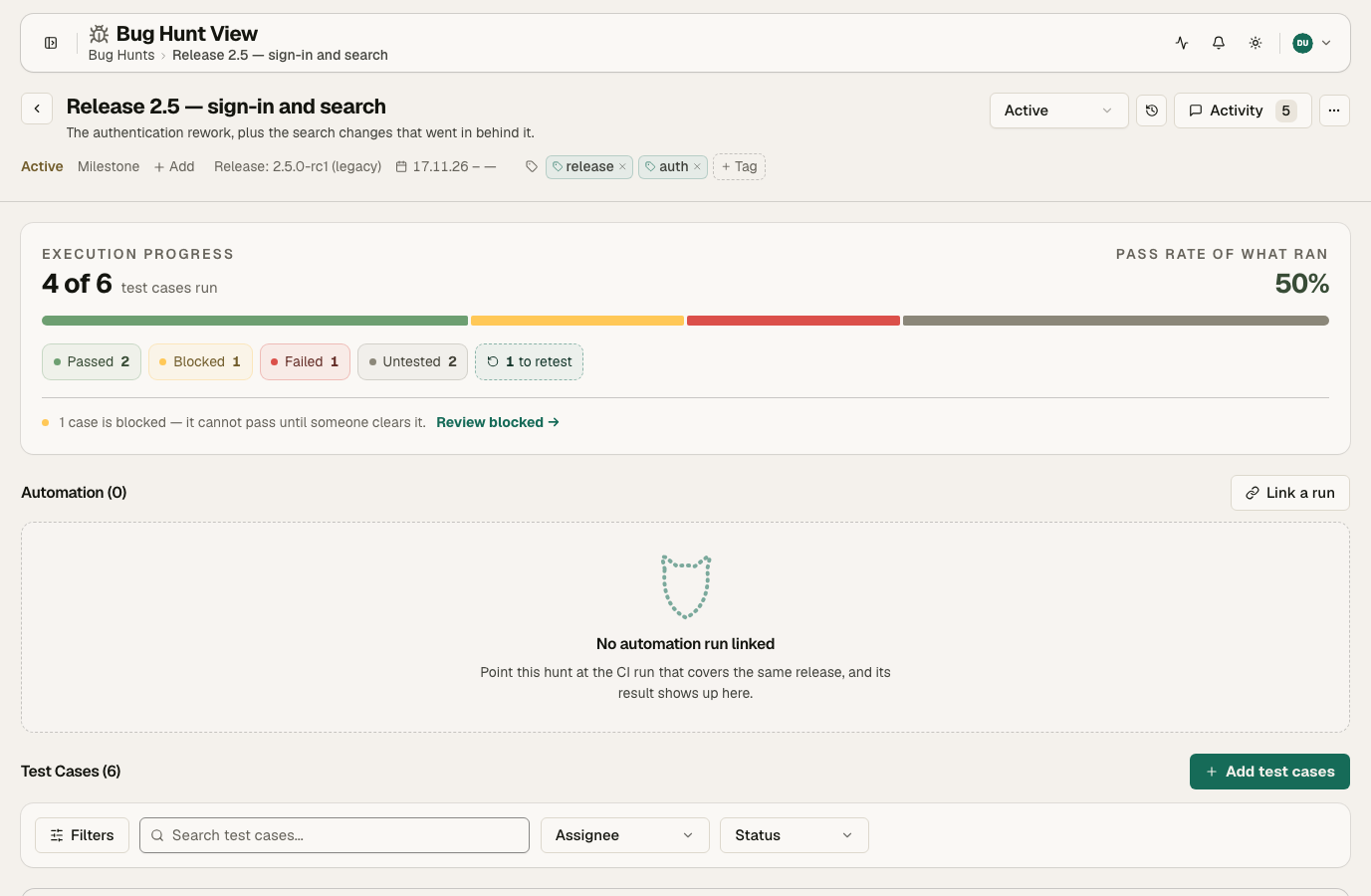
A bug hunt in progress in Sekee's demo. The counts in the header filter the list.
Set up the bug hunt
Go to Bug Hunts → Create and fill in:
- a name, such as "Checkout redesign bug bash"
- a description: this is rich text, so put the goal, the scope, the known issues and the severity scale here, where every participant will see it
- the start and end dates of the event
- the members taking part, and tags to find it later
Then add the test cases that cover the scope, individually, by folder or by tag. To spread them across people, select the cases, press Assign randomly and tick who should run them: Sekee shares them out evenly and shows how many each person will get before you confirm. Nothing is saved until you press Create, so you can reshuffle or adjust row by row.
People outside the QA team can take part as guests. A guest can run the test cases assigned to them, report bugs against those cases and comment, without being able to change the library. Assign randomly shares cases among members only, so give a guest their cases with the assignee picker on each row.
If the release has a milestone, put the hunt in it. A hunt can be in several milestones at once.
During the event
Each participant opens their test cases from the hunt and records a result on each step. The case's verdict follows the steps (Passed once every step has passed, Failed as soon as one fails), and a tester who cannot get any further sets Blocked by hand. A verdict set by hand stays put until someone changes it.
Bugs are reported against the case they were found in, with a title, a rich-text description, a severity and screenshots (paste one, drop a file or pick one). While someone runs a case, Known issues lists every bug still open against it from other hunts, which cuts down on duplicates. Right-clicking a step (or a long press on a phone) offers Quick comment and Report a bug without opening the side panel.
The host can follow progress from the hunt itself: search, and filter by assignee and status, to see who is stuck and what has failed. A filtered view is part of the address, so it can be pasted into the team chat.
For the exploratory half, create a session per charter (Sessions → Create) with a title, the charter, a planned duration and the participants. Sessions have their own clock, and bugs logged in them work the same way. Our guide to charters and sessions goes through them in detail.
Triage
The Bugs page lists every bug in the project, from bug hunts, sessions and automation runs alike. Use the Bug hunt and Session filters to see only this event's bugs, then work through them with the Status and Severity filters. Each bug has a page of its own where any member can change its status, severity and description, and discuss it in comments. Won't fix always asks for a reason, and the reason stays on the bug.
If the hunt and sessions are in the release's milestone, the milestone's Bugs tab shows the same list next to the rest of the release's readiness.
Close it out
When the hunt is over, move it to Completed. Everyone following the hunt gets a closing report by email, and each bug in it links back to its page in Sekee. If CI ran against the same build, Link a run puts that automation run on the hunt, so the manual verdicts and the automated results sit on one screen.
Bugs outlive the hunt that found them. They stay on the Bugs page, on the test case's known issues while they are open, and against any linked requirement, holding its coverage down until they are fixed.
The bug hunts and sessions pages in the manual cover every option.
- bug bash
- bug hunts
- exploratory testing
- release testing