AI test automation: 1,000 tests in two months with Claude
How Claude can write about 1,000 Playwright tests in two months, link each one in Sekee, and find product bugs along the way.
The Sekee team 9 min read
Here is what AI test automation looks like at scale. Over about two months, Claude writes roughly 1,000 Playwright tests, while one QA engineer chooses what to automate and reviews every test it produces. Below: how to pick the scenarios, the flow each test goes through, the bugs that turn up while writing them, what stays manual, and what goes wrong.
Full disclosure: I build Sekee, and you'll see it all through this post. Let's say you work for Brightwell (a fictional company) as its only QA engineer.
Brightwell, and where you start
Brightwell sells scheduling software to field-service firms: plumbers, heating engineers, electricians. Each firm signs up as a tenant. An office admin sets things up, a dispatcher books jobs, a technician gets them on a phone, and the end customer approves a quote and later pays an invoice, by card if they like. Emails go out in English or German, following the language the customer registered in. The app also calls a third-party route-planning API, and a few partner companies sell it under their own logo and domain, so most flows exist in several brands at once.
There are about eight developers and one QA engineer: you. Tickets live in Jira, CI is GitHub Actions, and the automation is Playwright in TypeScript. Claude Code runs in your terminal beside the test repo and talks to Sekee through the MCP connector. Sekee runs no AI model of its own. Claude works through the connector as you, with your permissions, and everything it creates there is marked as AI-made. That matters more than you'd expect.
When you start, the automated suite covers login and a handful of happy paths. Release testing is you, a list of manual test cases and a long afternoon.
Picking the 1,000 scenarios
Don't start by converting the manual library. Most of those cases were written for a person who already knows the product, and plenty of them check things that rarely break. Instead, get the team together for an hour on one question: if this broke on a Tuesday afternoon, who would notice first, and what would it cost us?
The answers sort themselves into groups:
- Money. Quotes, invoices, card payments, totals, currencies.
- What the customer sees outside the app. Mostly emails, in two languages and several brands.
- Tenant boundaries. A heating firm must never see a plumber's jobs, not even for a second after switching companies.
- Each role's main path. Office admin, dispatcher, technician, customer.
- Places that have broken before, taken from Jira's bug history.
What you leave out matters as much. Layout and visual polish stay manual. So do rarely used admin settings, and anything whose answer comes from the route-planning provider rather than from Brightwell. Multiply what's left by four roles, several brands and two languages, and the list runs to about 1,000 scenarios. Put them in order, money first, then emails, then tenants, and work down it.
One rule shapes everything after that: each scenario becomes one spec file and one test case, which keeps the link between "what we test" and "what CI runs" readable.
The flow every test goes through
Every test goes through the same five steps, and the steps do more for quality than any prompt. You ask in plain words, something like "automate: a German-speaking customer approves a quote from the email". Then:
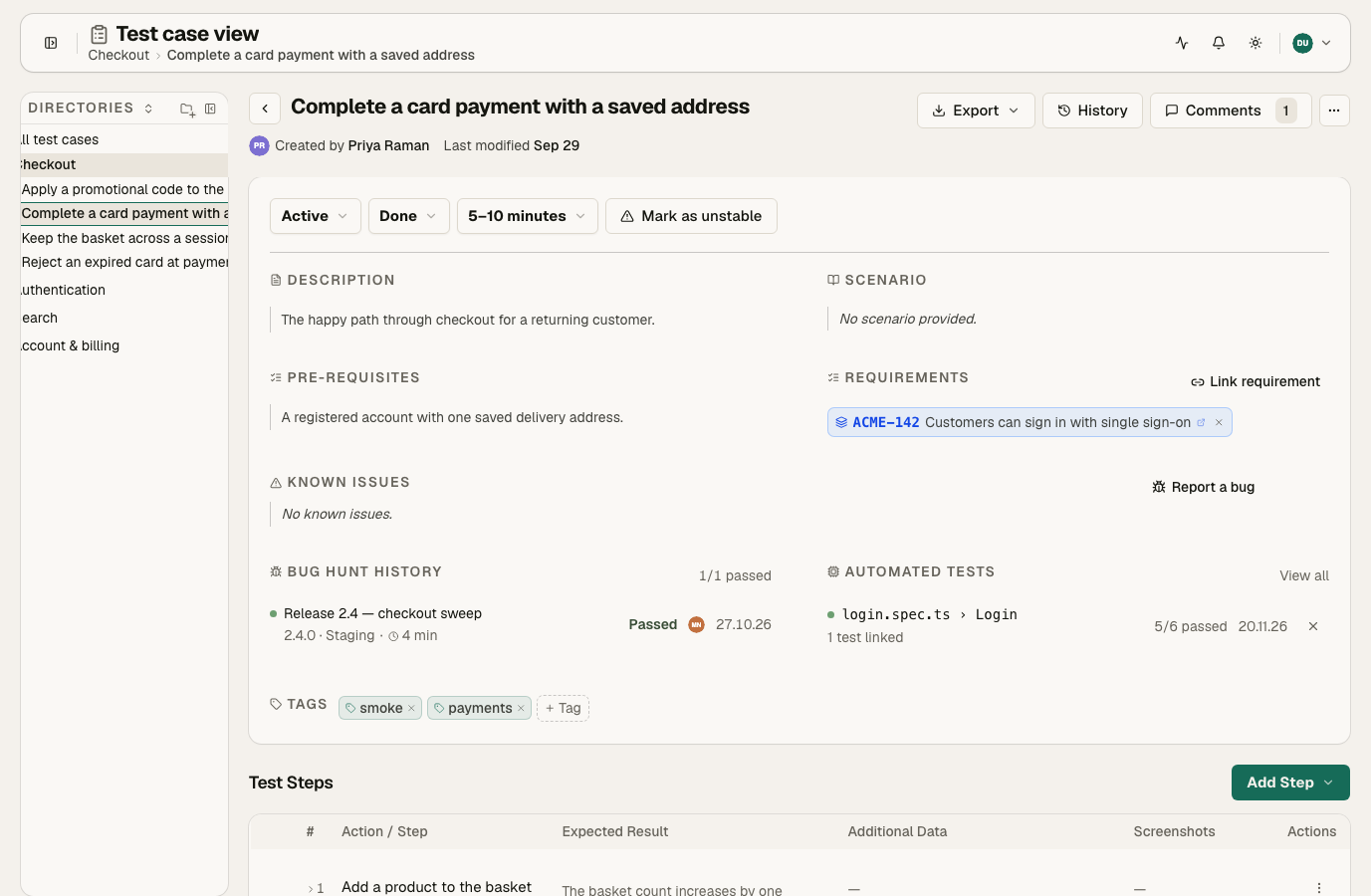
A test case in Sekee's demo, with its requirement, hunt history and linked automated test.
- Claude writes the Playwright spec in the test repo. API calls set up the data, the UI is used where a person's view is the point, and the assertions come from the requirement.
- It creates or updates the test case in Sekee over MCP, with steps a person could follow by hand. If a manual case for the scenario already exists, it updates that one rather than writing a twin.
- It links the automated test to the case. This waits for the first CI run, because the automated test only exists in Sekee once a report containing it has arrived.
- It links the case to a requirement and writes the requirement's description.
- You review what it wrote, and approve it or send it back.
The requirement description always has the same four parts. Here is one:
Requirement
A customer can approve a quote from the quote email, in the language they registered in.

Preconditions
- A tenant with German enabled
- A customer registered with language German
- A quote in status Sent to that customer

Acceptance criteria
Given a German-speaking customer with a sent quote
When the quote email arrives
Then its subject and body are in German and its Approve link opens that quote

Given the same customer
When they approve the quote from the link
Then the quote shows as Approved and the confirmation email is in German

Given a quote that has already been approved
When the customer opens the Approve link again
Then the page says it is already approved and nothing changes

Traceability
Verified by: Customer approves a quote from the German quote email
Brightwell's requirements are hand-written ones in Sekee. Sekee can mirror Jira issues too, but an assistant can't edit those descriptions, because they belong to Jira. When Claude writes a description, Sekee marks it Written by AI until a person rewrites it. Test cases get the same treatment: a case Claude creates is marked AI generated and lands in the Test Case Review queue, and a case it changes is marked AI modified and queued again. So your job becomes reading. You hardly type a test any more.
The bugs that turn up while writing the tests
Keep a running list of every bug found while writing a test, before the test ever runs on a schedule. One line each, with the spec that found it and the Sekee bug number. Some lines will be problems in your own specs. Others will be product bugs that have sat there for months, and each one turns up only because writing the test forces someone to say exactly what should happen and then check. At Brightwell, the list could look like this.
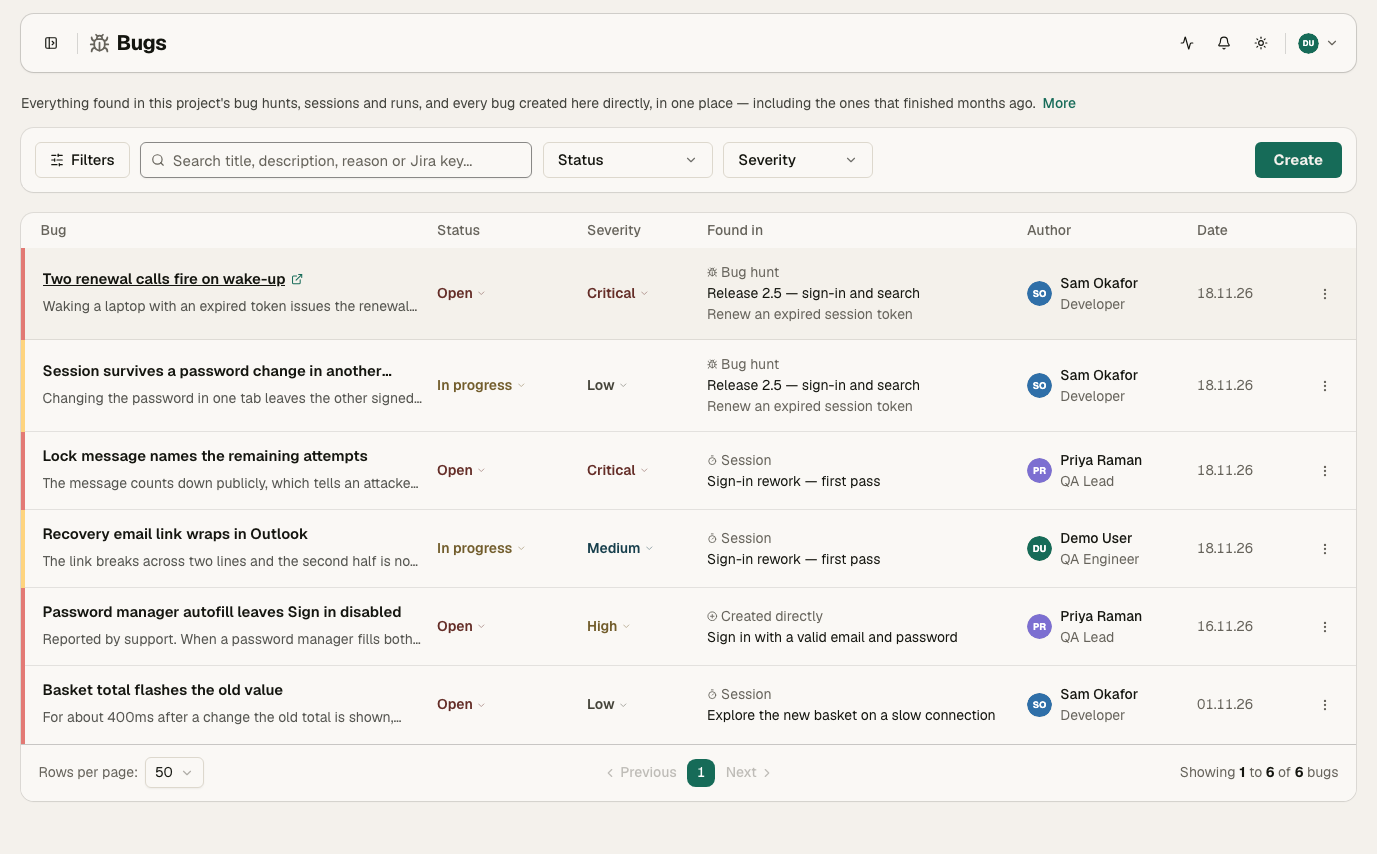
One list of bugs in Sekee's demo, wherever they were found.
The currency on the quote. For a UK tenant, the quote screen shows the total in pounds, while the API returns the same amount with the currency code for euros. The spec creates the quote through the API and reads it back in the UI, so it compares the two. Nobody catches it by eye, because the number itself is right.
The email that never goes. Customers who haven't answered a quote are meant to get a reminder. The spec waits for it in the test mailbox and times out. You assume the test is wrong and spend twenty minutes proving it isn't. The reminder is never sent for a quote that was edited after it went out.
The duplicate customer. The dispatcher's new-customer form warns when a customer with the same email address already exists. It catches an exact copy. It doesn't catch the same address typed in lower case, so one household can end up as two customers with two job histories.
The wrong logo. The invoice email spec runs once per brand and checks the logo in each. One partner brand's invoice email carries Brightwell's own logo, so that partner's customers get a bill with a company name they have never heard of.
None of these needs a clever test. They need a test that pins down the expected result before anyone looks at the actual one. Each goes into Sekee as a bug written to the same nine-section template, and from there to Jira for the developers.
What stays manual
Choosing what to automate is still yours, and so is the order. Claude writes a good spec for a scenario and has no idea which scenario would hurt most if it broke.
Review is yours too. Read every spec diff before it merges, and every case in Test Case Review before you approve it. Sekee doesn't let the connector approve test cases an assistant wrote. An approval records a person's name against the text they read, and if Claude edits an approved case later, the approval is withdrawn and the case comes back to you.
Triage is shared. After each run Claude writes the run's AI summary, sorting the failures into product bugs, test defects and notes, and saying plainly which ones it hasn't checked. You confirm the product bugs before anything goes to a developer.
The rest is the testing that isn't scripts. Exploratory sessions are where the surprising bugs come from. Manual bug hunts cover a release sign-off or a partner certification, step by step. And the Jira handoff stays with you: when a bug goes to Jira, set the Sekee bug to In progress and leave a note saying "Reported to Jira" with the key. Don't close Jira tickets from the QA side.
What goes wrong
Claude tests the bug. Say the first draft of the German quote spec asserts the English subject line, because that's what the app sends. Claude has read the app instead of the requirement. Review catches it, and it's the main reason to read every assertion. The expected value always comes from the requirement, and that sentence belongs in your AI rules so you don't have to repeat it.
Two requirements with the same name. Ask Claude to link a case to "the quote approval requirement" and it may link by title, which the connector treats as a request to write a new requirement. You end up with two, each holding half the coverage. Have Claude look the requirement up first and link it by its id.
Too many links. If Claude links every test entry in a spec to the case, one case can show six automated tests, and a single flaky setup step drags it down. Link one representative entry per spec, which has its own trade-off.
Random 429s. With several suites running in parallel and logging in as the same account, you hit the login rate limit and tests fail at random. Retries hide the problem without fixing it. Throttling logins across processes fixes it.
Review falls behind. At this pace Claude produces cases faster than one person can read them. The queue grows, and an AI-written case nobody has read only looks like coverage. Stop asking for new tests until the queue is empty, and keep a rule from it: no new scenario while anything in the review queue is older than a day.
FAQ
Can AI write Playwright tests you'd actually keep?
Yes, if someone who knows the product reviews them. Claude's specs run and read well from the first week. The problems are in what they assert, not in how they're written, and that's the part a person has to check.
What does an AI assistant need to automate tests with a test management tool?
Access to your test repo for the specs, and a connection to the test management tool for the cases, links and requirements. In Sekee that connection is the MCP connector, which works with Claude, Copilot, Cursor and other MCP clients. The assistant acts as you, with your permissions, and its work is labelled as AI-made.
How many tests should you automate first?
Start from risk, not from a number. At Brightwell the list stops at about 1,000 because that's where the "this would really hurt" scenarios run out across every role, brand and language. A smaller product would stop sooner, and that's fine.
The features page shows how test cases, requirements and automation runs fit together in Sekee, and the live demo on the home page lets you click through them yourself.
- AI test automation
- Claude
- Playwright
- test strategy