Exploratory testing charters and session-based testing
Write charters that focus exploratory testing, run timeboxed sessions and debrief so findings lead somewhere. With templates and examples.
The Sekee team 8 min read
Exploratory testing is testing where you design the next test from what the last one taught you. Instead of following steps written in advance, the tester learns how the product behaves, forms a question, tries something to answer it, and repeats. It finds the bugs nobody anticipated, which are often the ones that matter.
Its weakness is that it is hard to plan and hard to report. "I spent the afternoon exploring" tells a test lead nothing about what was covered or what is left. Session-based test management (SBTM), described by Jonathan and James Bach around 2000, fixes that with three simple pieces:
- a charter that says what a session is for,
- a timeboxed session of uninterrupted testing against that charter,
- a short debrief afterwards, where findings turn into decisions.
This guide covers each piece, gives you templates for all three, and then shows how timed sessions work in Sekee.
What a charter is
A charter is the mission for one session. It names an area to explore and what you hope to learn there, without prescribing steps. It is narrower than "test the app" and much broader than a test case.
A widely used template comes from Elisabeth Hendrickson's book Explore It!:
Explore target with resources to discover information.
- The target is where you are looking: a feature, a screen, an API, a workflow.
- The resources are what you bring: data, tools, devices, a persona, a technique.
- The information is what you want to find out: a kind of risk or a question you need answered.
Some examples:
- Explore checkout with expired, declined and 3-D Secure test cards to discover how payment failures are explained to the shopper.
- Explore CSV import with very large files, unusual encodings and duplicate rows to discover where an import fails without saying so.
- Explore account settings on a phone with a throttled network and interrupted sessions to discover states where changes are lost or half-saved.
- Explore the public API's pagination with concurrent writes between page requests to discover skipped or repeated records.
Two common mistakes:
- Too broad. "Explore the admin area" gives the tester no reason to go anywhere in particular, and the debrief has nothing to measure against.
- Too narrow. "Check that Save stores the record" is a test case. If you can write the expected result down in advance, it does not need a session.
Where charters come from
Good charters come from risk. When you plan a release, look at:
- what changed, and what it touches
- the requirements or user stories in the release, especially the vague ones
- areas with a history of bugs, or recent support tickets
- integrations, migrations and anything that depends on timing or the network
- questions left over from the last round of debriefs
Write more charters than you have time for, then run them in order of risk. The ones you never get to are a useful list to show whoever decides when to ship.
Running a timeboxed session
A session is a block of uninterrupted testing against one charter. In SBTM sessions usually run 60 to 120 minutes. If your team is new to it, 45 to 90 minutes is a comfortable start: long enough to get past the obvious, short enough to stay focused.
The timebox does three jobs. It protects focus, because the tester has agreed to ignore chat for an hour. It makes work plannable, because a release that needs twelve charters needs roughly twelve sessions. And it stops one interesting rabbit hole from eating a whole day.
During the session:
- Start with a quick survey of the target, so you know its shape before going deep.
- Vary things on purpose: data (empty, huge, unicode, boundary values), state (new user, old account, half-finished flow), timing (double clicks, slow network, two tabs) and interruptions (back button, reload, losing the connection).
- Take notes as you go, not afterwards. Short, timestamped lines are enough: what you tried, what happened, what you wondered.
- Report bugs while the evidence is fresh, with a screenshot or a recording.
- Keep questions apart from bugs. "Is it meant to round down?" is a question for the product owner, not a bug yet.
- Note ideas that fall outside the charter instead of chasing them. They are tomorrow's charters.
SBTM also suggests noting roughly how the time went, split into test design and execution, bug investigation and reporting, and setup. If setup ate half the session, that is worth knowing: it usually means the test environment or the data needs work, not the tester.
Session sheet template
SESSION SHEET

Charter:     Explore <target> with <resources> to discover <information>
Tester(s):   <names>
Date:        <date>      Start: <time>     Planned: <minutes>     Actual: <minutes>
Build / env: <version, URL, device, browser>
Test data:   <accounts, files, cards used>

NOTES (timestamped as you go)
<hh:mm>  <what I tried / what happened / what I wondered>

BUGS
- <title> | severity | link

QUESTIONS (not bugs yet)
- <question> | who can answer

NEW CHARTER IDEAS (outside this charter)
- Explore <...> with <...> to discover <...>

TIME (rough split)
Test: <%>   Bug investigation and reporting: <%>   Setup: <%>
Covered: <what was explored>
Not covered: <what was left out, and why>
The debrief
The debrief is a short conversation, usually ten to fifteen minutes, between the tester and a lead or a peer, held as soon as possible after the session. It is the step teams most often skip and the one that makes the rest worthwhile: it is where bugs get triaged, questions get answers and gaps become new charters.
The classic SBTM debrief checklist goes by the mnemonic PROOF:
- Past: what happened during the session?
- Results: what was achieved? Bugs, questions, coverage.
- Obstacles: what got in the way of good testing?
- Outlook: what still needs doing? Which new charters came out of it?
- Feelings: how does the tester feel about the area? "Something is off in the totals" is worth hearing even before there is a bug.
Debrief template
DEBRIEF

Session:     <charter, tester, date>
Past:        <summary of what was tested and how>
Results:     <bugs filed (links), questions raised, areas covered>
Obstacles:   <environment, data, access or knowledge problems>
Outlook:     <what is left; new charters to add to the backlog>
Feelings:    <confidence in this area: high / medium / low, and why>

Decisions
- <bug> → <fix now / later / won't fix, with reason>
- <question> → <who answers, by when>
- <new charter> → <priority>
Planning a round of sessions
For a release, keep a simple charter backlog: one line per charter, its risk, its status (not started, done, needs another session) and a link to the session. Review it in planning the way you would review open bugs. It answers the question every release meeting eventually asks: what have we explored, and what have we not?
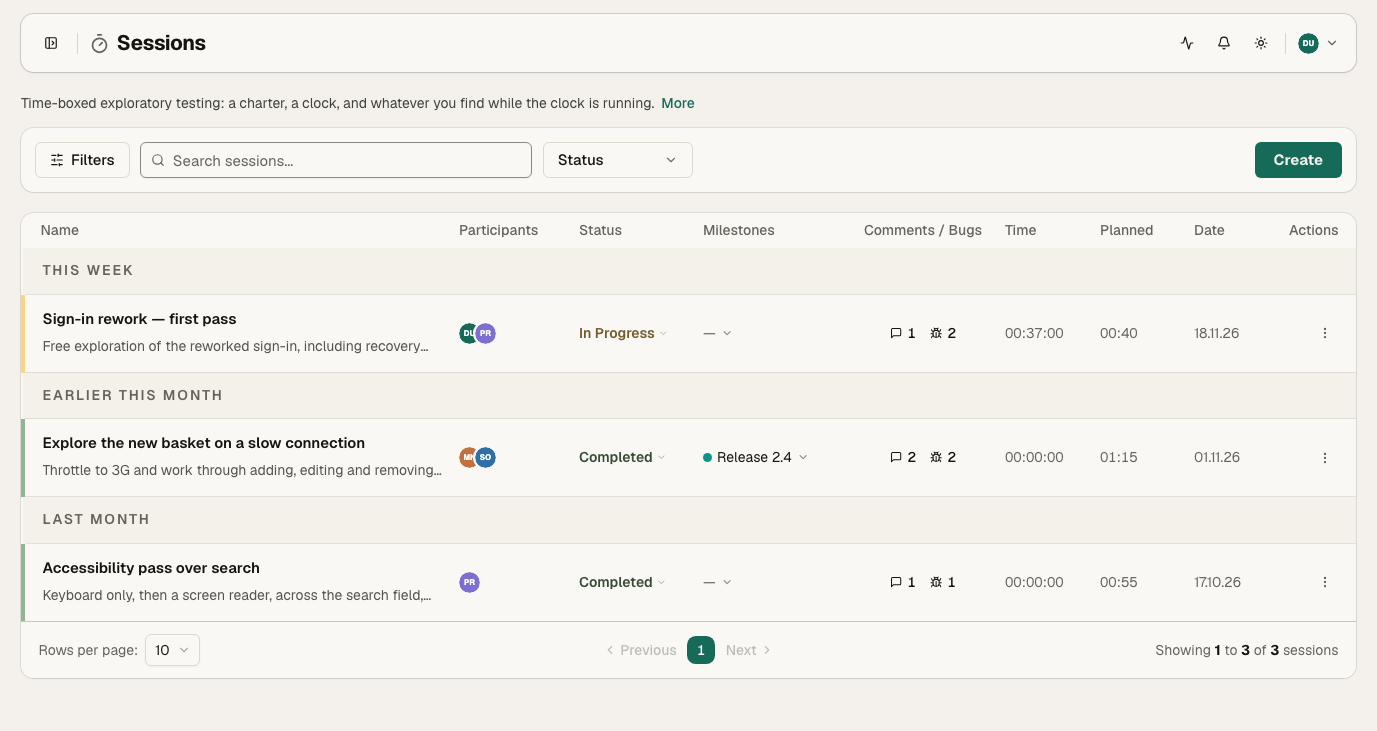
Exploratory sessions in Sekee's demo, with time spent against the plan.
Exploratory sessions in Sekee
In Sekee, timed exploratory testing is called a session. It is a separate feature from bug hunts: a bug hunt is a scheduled event where people run a chosen set of test cases and record verdicts, while a session has a charter instead of steps, and a clock.
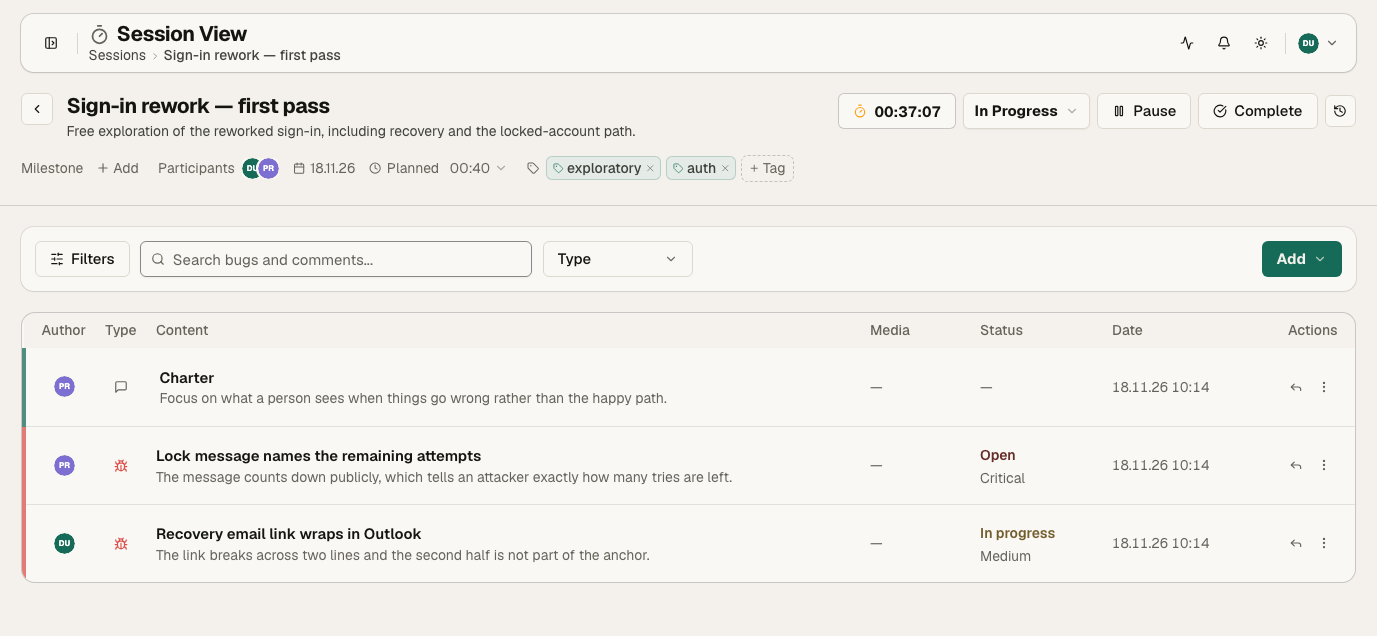
A session in progress: the clock, the charter, then notes and bugs as they come.
Create the session
Go to Sessions → Create and fill in:
| Field | What to put in it |
|---|---|
| Title | Short and findable, e.g. "CSV import: large and odd files" |
| Charter | The full charter. It is rich text, so data, accounts and links can go here too |
| Tags | Labels for finding it later |
| Date | When it is planned for |
| Planned duration | 15 minutes to 8 hours, in quarter-hour steps |
| Participants | Everyone who may log notes and bugs against it |
The title and the planned duration can be changed later from the session's header. Both are guesses made before the session started and are often wrong by the time it ends.
A session can belong to one or more milestones, so a release's milestone shows its sessions next to its bug hunts and automation runs. That makes the charter backlog visible in one place.
The clock
Press Start and the session moves from Planned to In progress with a real timer running. Pause stops it, Resume carries on, and the elapsed time is saved each time it is paused, so it survives a reload, a different device or a colleague opening the page. When you are done, mark it Completed. Comparing the time spent with the planned duration is a quick check on how well the charter was sized.
Notes and bugs as you go
While the session runs, you log two kinds of entry:
- Comments: observations, setup notes, questions, anything worth recording.
- Bugs: with a title, a severity and a status (Open, In progress, Done or Won't fix, which asks for a reason).
Two shortcuts keep you in the flow: ⌘/Ctrl + Enter starts a comment and ⌘/Ctrl + Shift + Enter starts a bug. Both take rich text and attachments, including screenshots and video. Logged something as the wrong kind? Convert to bug and Convert to comment in the entry's ⋯ menu change it in place, keeping its words, attachments and author.
Every bug from a session also appears on the project's Bugs page, where Found in links straight back to the session with the bug highlighted.
Debrief in the session itself
The session page is the record of the session, so it is a natural place to debrief. Use Reply on any comment or bug to ask a question about it and get an answer in the same thread, and Copy link in an entry's ⋯ menu to send someone straight to one finding.
When the session is marked Completed, everyone following it receives a summary email that leads with the session's name and lists its bugs and comments, each linked to where it was left. For the bugs themselves, the Bugs page with its Session filter is the triage list.
Capturing evidence
Sekee's capture extension for Chrome, currently in preview, records the tab you are testing or a whole screen while you work. You can take screenshots and write notes or test steps as you go, and at the end it exports a ZIP with the video, a readable report and, optionally, page diagnostics from the tab. Recordings are processed on your device and stay there until you decide to share them. Attach the screenshots, or a clip of the recording, to the session's comment or bug, so the evidence sits next to the finding. A desktop recorder, also in preview, does the same outside the browser.
The sessions page of the manual covers every option, and our guide on how to run a bug bash shows how sessions and bug hunts work together in a single event.
- exploratory testing
- session-based testing
- test charters
- sessions